
FAQ
-
1. Daily maintenance and precautions for digital printing
1. Print a test pattern before finishing work every day to ensure all nozzles eject ink normally.
2. Use a printing mode of 4 passes or more whenever possible without delaying production. This mode causes the least wear to printheads.
3. Maintain a stable temperature and humidity. The optimal environment is around 25°C with a relative humidity of approximately 60%.
4. Keep the working area dust-free. Do not place the machine alongside equipment that generates smoke or dust.
5. Do not place any items on the machine, especially liquids.
6. The machine must be properly grounded. Use thick copper wires to connect the screws at both ends of the machine stand to the main unit, and strip off the insulation on the wire surface. Bury the other end of the copper wire at least 1 meter underground. Connect it to a shared ground if available. Never connect the wire to lightning rods, heating radiators or water pipes.
7. Keep common household appliances away from the machine, and maintain a safe distance from strong magnetic and electric fields.
8. Do not use low-quality printing media, as they may damage the printheads.
9. If broken or dotted ink lines still appear after repeated cleaning, pause operation for 10 minutes or soak the printhead with dedicated cleaning solution. If the nozzles remain clogged after 5 consecutive cleaning attempts, contact your dealer’s technical engineer.
10. When refilling ink, keep the ink level between the first and second liquid level marks inside the ink cartridge.
11. Store ink in a cool place away from direct sunlight. Use up opened ink within half a month for best performance.
12. Empty the waste ink tank at least once a week to prevent overflow.
13. Keep the computer antivirus software active. Disable the system firewall when outputting images via RIP software.
14.Check the status of nozzle spitting and wiper blades at least once a week. Remove lint and other debris with tweezers or tissue paper. Follow the above rules when moving the machine or replacing ink. -
2. How to maintain the nozzle of a digital printing machine?
Due to Epson's printhead encryption policy, the market price of printheads has been continuously rising. While purchasing printheads, it is essential to master proper maintenance knowledge. Daily maintenance directly affects the printing performance and service life of printheads. Standard maintenance not only reflects rigorous work practices but also cuts operational costs. Below is a complete guide to the maintenance of digital printing machine printheads.
1. Storage Environment
Printheads are precision components and require strict storage conditions.
For spare printheads not in use, store them in a sealed, dry environment with a stable temperature between 20°C and 25°C. Keep the area dust-free. Dust ingress will impair printing quality, shorten the printhead lifespan and lead to accelerated component wear.2. Operation Specifications
Printhead Replacement Steps
Open the carriage cover
Detach the ink sac from the printhead
Unscrew the three fixing screws of the printhead
Install the new printhead
During installation, avoid collisions with foreign objects and do not touch the printhead surface with bare hands. If dust or stains appear on the printhead, clean it with dedicated printhead cleaning solution to keep it in good condition.3. Ink Selection
Ink quality determines the color rendering and overall printing effect, and also exerts a great impact on printheads. The use of inferior or incompatible ink will cause printhead clogging, intermittent printing, defective outputs and color deviation. These issues will lead to product returns, waste manpower and materials, drive up costs and result in unnecessary losses.4. Printhead Cleaning
Printhead clogging is the most common malfunction of digital printing machines. We have sorted out targeted cleaning solutions for different types of clogs.I. Removing Soft Clogs
Soft clogs refer to broken ink jets caused by increased ink viscosity. The ink residue usually only adheres to the nozzle surface.
Dip the nozzle in original ink and perform repeated cleaning. This method is simple, fast and causes no physical damage to the printhead, yet it consumes a large amount of ink and increases usage costs.
Use the built-in printhead cleaning function in the printer driver. It is easy and quick to operate, but delivers limited cleaning results.Precautions
Do not repeat the above two cleaning methods more than three times. Mild clogs can generally be cleared within three attempts. If the clog remains, it means the blockage is severe. Excessive cleaning will waste expensive ink without solving the problem, and further troubleshooting is required.
Air blockage between the ink cartridge (sponge-filled type) and printhead may also cause occasional broken ink jets. Do not perform repeated cleaning. Simply leave the machine idle for a while and restart it to resume normal operation.
Never mix different types of ink. Do not add new ink to the cartridge immediately after purchase. Draw a small amount of new ink with a clean disposable syringe and inspect it under light for suspended particles. Discard the ink if any particles are found.
Mix a portion of the existing ink with the new ink, let the mixture stand for 24 hours and check for chemical reactions such as crystallization. If any changes occur, the two inks are incompatible and must never be blended.II. Removing Hard Clogs
Hard clogs are caused by chemically solidified ink or foreign impurities inside the printhead, which are difficult to resolve. Four effective solutions are listed below:1. Soaking Method
Applicable scenario: Slight clogging
Required tools: 95% alcohol, clean cup, flat-bottomed metal container
Working principle: Dissolve dried ink particles with moderately active organic solvent. 95% alcohol is mandatory; other concentrations will worsen the clog.
Operation: Pour a small amount of 95% alcohol into a flat-bottomed metal container, just enough to submerge the stainless steel edge of the printhead. Make sure the PCB board does not come into contact with alcohol. The soaking time ranges from 2 hours to 4 days.
This method features excellent cleaning effect and no physical damage to the printhead, but it takes a long time.2. Pressure Flushing Method
Applicable scenario: Moderate to severe clogging
Required tools: 95% alcohol, clean cup, disposable syringe, disposable infusion set
Working principle: Generate pressure via the siphon effect of the syringe to inject alcohol into the printhead and dissolve dried ink.3. Distilled Water Cleaning Method
Applicable scenario: Severe clogging
Required tools: Decoded empty ink cartridge, disposable syringe, medical distilled water (purified water is acceptable as a substitute)
Working principle & Operation: Similar to the pressure flushing method. Draw distilled water with a syringe and inject it into the ink cartridge through the air vent. After a while, extract the liquid out. Repeat the process several times to thoroughly flush residual ink inside the cartridge.4. Ultrasonic Cleaning Method
Applicable scenario: Extreme clogging
Working principle: High-frequency ultrasonic vibration agitates water molecules to crush and dissolve stubborn dried ink particles.
Operation: Gently place the printhead into an ultrasonic cleaner. Add purified water or dedicated printhead cleaning liquid to submerge the printhead’s stainless steel edge (keep the PCB board dry). Run the machine for 10 to 15 hours.
This method achieves the best cleaning performance and can restore even long-clogged printheads with simple operation. Its downside is the relatively high maintenance cost. Ultrasonic cleaners are available in hospitals, optical shops and mobile phone repair stores (some offer free services), and ultrasonic humidifiers can also be modified for this use.
Important note: Only use purified water or dedicated printhead cleaning liquid. Do not use the standard cleaning solution from optical shops, hospitals or mobile phone repair stores. Such solutions contain impurities or strong organic solvents that will cause irreversible damage to printheads. -
3. Guide to choosing digital printing equipment
The development of digital printing is the result of the joint development of equipment, consumables, and material application solutions. Digital printing has covered various fields such as graphic and image, printing, home decoration, textiles, etc. Below, we will elaborate on the digital printing equipment and solutions for textiles.
T-shirt print:
1. Polyester can be sublimated and transferred using heat transfer paper,
2. Hot stamping (pigment ink+hot stamping paper) is suitable for various materials, and transfer film (weak solvent+transfer film) is also suitable for various fabrics. Transfer film is particularly suitable for knitted fabrics due to its tensile strength.
3. Choose a flatbed machine for direct spraying of paint, preferably in A2 format, especially suitable for blended fabrics.
4. Flat active direct spraying (requires sizing treatment), or cold transfer printing of cut pieces.Silk printing:
To use active or acidic printing,
1. Due to sizing, the smoothness of the silk fabric is improved, and it can be directly printed and output using a grooving machine,
2. For elastic fabrics, choose a belt type digital printing machine.Cotton print:
Generally, tape guided printing machines are used, suitable for various fabrics such as weaving and knitting.Flag print:
Dispersed direct printing is generally suitable for dispersed direct printing and high-temperature color development because most flags do not require washing and require a dual transparency effect.Velvet print:
Choose a belt type digital printing machine, especially suitable for industrial grade digital printing machines with large ink volume, no white leakage, and suitable for processing large ink droplets.Printed wool sweaters and other cut pieces:
Flat panel digital printing machine with high positioning accuracy and seamless printing. -
4. Thermal transfer printing process for clothing printing
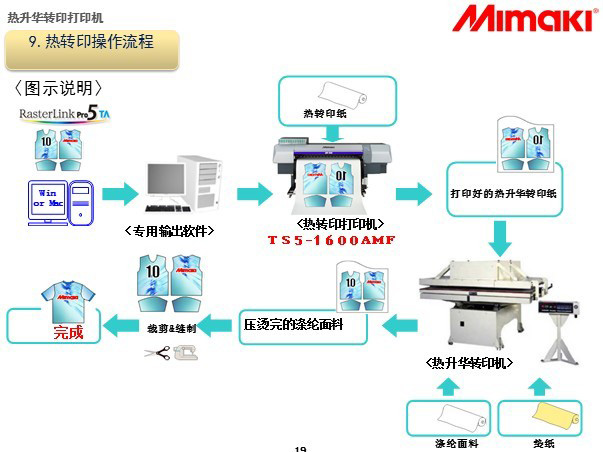
-
5. Overview of heat transfer printing
1. What is heat transfer printing
The commonly referred to heat transfer printing is a transfer printing technology and product that uses heat transfer equipment to heat the patterns and images on heat transfer paper to 180C0-230C0 and transfer them to different material media for printing.Thermal transfer printing technology was first applied in the textile printing and dyeing industry, as well as the shoe material industry. Later, with the development of the times and the advancement of technology, the application fields continued to increase, especially with the emergence of digital technology and personalized consumption concepts, which made the application of heat transfer printing technology more popular and extensive. The application products emerged endlessly, covering almost all material fields. For example: metal, wood, stone, ceramics, glass PVC、 Heat transfer printing technology can be applied to leather and synthetic fabrics to transfer exquisite patterns and images, producing and manufacturing exquisite products.
Here, we classify heat transfer printing into traditional heat transfer printing and digital heat transfer printing based on whether there is a plate or not.
(1) Traditional heat transfer printing
Traditional heat transfer printing has two printing methods, one is sublimation transfer printing and the other is thermosetting transfer printing. Sublimation method refers to the process of transferring the pattern on the printed paper onto the desired medium after the color paste produced by thermally rising dispersed dyes is printed onto the paper using screen or gravure printing; The thermosetting transfer printing method refers to the use of thermosetting ink (also known as hot melt adhesive) to screen print printed paper, and then transfer the patterns on the printed paper to products such as cultural shirts and clothing.There are significant differences in the application of the two printing methods. Sublimation transfer printing is mainly used on synthetic fabrics and hard materials coated with heat transfer printing, while thermosetting transfer printing is mainly used on pure cotton products. The difference in texture between the two printing methods is that the sublimation pattern does not change the original texture of the material after transfer printing, and has a good hand feel and appearance. After the transfer printing of the thermosetting pattern, a layer of adhesive is formed on the surface of the attachment, which has poor hand feel and is not breathable. The two printing methods have their own advantages and disadvantages in production, and each has its own characteristics.
There are three traditional techniques for sublimation heat transfer printing: screen printing heat transfer printing, gravure printing (copperplate, electric engraving) heat transfer printing, and offset printing heat transfer printing. The characteristic of traditional sublimation heat transfer printing is plate printing.
(2) Digital heat transfer printing
Digital heat transfer printing technology is a new technology that combines traditional heat transfer printing technology with digital printing technology to print color images and patterns in a plate free form. Its characteristic is that the application of digital printing technology to print color patterns and images does not require plate making, saving the plate making process and costs, making it suitable for producing personalized printed products. The technical feature of digital heat transfer printing is that the digital printing equipment uses dedicated heat transfer color printing ink and heat transfer printing paper.At first, this technology was mainly applied in advertising, signage, identification cards, and ceramic image production in China. Later, with the expansion of application fields, it was more widely used in industrial production, such as digital printing and dyeing, clothing production, shoe material production, webbing, clothing labels, flags, and other industrial production. The number of application products continued to increase.
(3) The difference between traditional heat transfer printing and digital heat transfer printing
1. The difference in printing methods: Traditional heat transfer printing belongs to plate printing; Digital heat transfer printing belongs to printless printing.2. Difference in printing color quality: Traditional heat transfer printing cannot effectively solve the problem of color reproduction; Digital thermal transfer printing can solve this problem as long as the ink quality is guaranteed.
3. The difference between application products: Traditional heat transfer printing application products are relatively single; Digital heat transfer printing products are relatively widely used.
4. The difference in market positioning: The traditional heat transfer printing market is positioned as a mass market; The digital heat transfer printing market is positioned as a personalized market.
5. The difference in production quantity: Traditional heat transfer printing has a large production capacity and is suitable for producing large quantities of mass-produced products; Digital heat transfer printing has a small production capacity and is suitable for producing small batches of personalized products.
6. The difference in market prices: Traditional heat transfer printing products have lower market prices due to their mass market nature; Digital heat transfer printing products have a high market price due to their personalized nature.
(4) How to understand and distinguish between the traditional heat transfer printing market and the digital heat transfer printing market
The digital heat transfer printing market is a personalized new market, and its products and market prices are determined by the concept of personalization. Digital heat transfer printing products and technology are the development and extension of traditional heat transfer printing. Two markets coexist, complement each other, and are independent of each other, forming different market prices and consumer groups.The traditional heat transfer printing market is a low-priced market. The digital heat transfer printing market is a high priced market. The difference between two markets cannot be simply judged by price. The fundamental difference between the two markets lies in the quality, content, form, and technological content of the products. Traditional heat transfer printing cannot produce high-quality and personalized products required by digital heat transfer printing due to technological limitations such as plate making and color expression.
So, the market targeted by digital heat transfer printing is the consumer group of high-value application products. Due to the clear market positioning of digital heat transfer, it has both relations and no contradiction with the traditional heat transfer market, and has different consumer groups and application fields. Considering the production cost and added value of digital heat transfer products, digital heat transfer technology does not enter the traditional price range of the heat transfer market.
2. How to understand and recognize digital heat transfer printing technology
(1) Digital heat transfer printing technology
Digital heat transfer printing technology is a new technology that combines traditional heat transfer printing technology with digital printing technology to print color images and patterns in a plate free form. The earliest countries to apply this technology include the United States, South Korea, Italy, Switzerland, China, and other countries. In terms of market size in the past two years, China has become the world's largest digital heat transfer printing processing market.Here, the digital thermal transfer printing we are going to talk about is based on inkjet printing technology as the technical form of digital thermal transfer printing, because this technical form can ensure a certain width and length, which is suitable for industrial production.
(2) The Market Significance of Digital Heat Transfer Printing Technology
Digital heat transfer technology can be said to be a new technology that has emerged to adapt to the development of personalized markets and consumers' demand for personalized products. It is an effective supplement to traditional heat transfer technology and the traditional heat transfer product market. So strictly speaking, the market positioning of digital heat transfer printing technology and products is the personalized product market. Traditional heat transfer printing products are difficult to produce personalized products in small batches due to technological limitations and plate making costs. So, in the traditional heat transfer printing market, digital heat transfer printing technology was a market gap before the emergence of personalized products. The emergence of this technology makes it possible to produce personalized heat transfer printing products. Moreover, the printing quality of digital heat transfer products' image patterns far exceeds that of traditional heat transfer technology. This is also the reason why digital heat transfer printing technology can be promoted and popularized in just a few years.3. The core technology of digital heat transfer printing - sublimation (heat transfer printing) ink
(1) Thermal sublimation ink (also known as thermal transfer ink) is a digital printing ink made from low-energy, easily sublimated dispersed dyes, printed on transfer paper, and heated to quickly produce images on exquisite materials such as porcelain, metal, silk, synthetic fabrics, etc. It is very suitable for personalized market needs and environmental protection requirements.(1) Thermal sublimation ink is mostly formulated from dispersed dyes used in textiles, other chemical additives, and water. Disperse dyes have a wide range of applications in textile printing and dyeing due to their saturated color and good weather resistance, and are still one of the main raw materials in the printing and dyeing industry. The traditional textile printing and dyeing industry, which uses dispersed pigments for dyeing, has serious environmental pollution problems and is not suitable for small-scale production. The emergence of sublimation ink has effectively compensated for this deficiency.
(2) Overview of the Development of Sublimation Ink
The first generation of digital sublimation ink was developed and patented by Sawgrass Corporation in the late 1990s, with its product trademark being Sublijet ®, Mainly suitable for piezoelectric printers such as Epson, ROLAND, MIMAKI, and MUTOH. Subsequently, companies such as Dupont, BASF, Sensient, Ciba, etc. recognized the huge business opportunity of this product and quickly launched similar products. Before 2001, due to the immaturity of nanotechnology, various companies had problems with ink quality, so thermal transfer printing technology and related products did not develop rapidly. Dramatically, in 2002, BASF, in order to maintain its leading position in the sublimation ink industry, sued Sawgrass in a US court for invalidation of its patent after failing to acquire Sawgrass. Sawgrass almost went bankrupt in both lawsuits, but ultimately won the lawsuit. Sawgrass later monopolized the sales of sublimation ink in the US market through patent protection. At the same time, companies such as Dupont, BASF, Ciba, Sensient, etc. can only sell through payment of patent fees and sawgrass authorization, and gradually withdraw from the sublimation ink market. Due to Sawgrass's patent monopoly, the high price of sublimation ink in the European and American markets has resulted. www.enprinting.cnTo achieve good results in heat transfer printing, a comprehensive effect of machine, software, transfer paper, ink, transfer conditions, and transfer material is required. In this regard, Sawgrass Corporation in the United States is the company that invests the most research and development funds to develop related products. The images transferred with its supporting products and processes can reach a professional level, but due to its expensive price, it is currently mainly sold in the European and American markets.
If we only compare based on the quality of ink, Sawgrass's ink is the most stable; The ink quality and stability of Lechler SPA company in Italy are also very good; The color reproduction of Korean ink has certain issues, but the overall quality is still good, with almost no clogging phenomenon; Among domestic inks, Zhengzhou Hongsheng has demonstrated strong research and innovation capabilities, with the HOTME produced by the company ® Thermal sublimation ink has made significant breakthroughs and improvements in the past two years, especially with the increasing number of applications and customer groups. It has made great progress in color, smoothness, stability, and other aspects, and has gained recognition from customers for its high cost-effectiveness in both wide and desktop applications. At the same time, its newly launched thermal sublimation ink, DK, has met many customers' high requirements for black with its good blackness and contrast.
At present, the domestic sublimation market mainly focuses on small-scale applications such as desktop printing, but wide format and industrial applications have gradually emerged and are rapidly becoming popular, especially in flag and clothing production where this technology is widely used. Most of the companies mainly used for desktop printing, such as personalized franchising and chain promotion, have achieved localization, such as HOTME in Zhengzhou Hongsheng ® Sublimation transfer ink, JCD from Shanghai Jiecai ® Companies such as sublimation transfer ink and Yingkewei from Chengdu have become strong contenders in this market. In terms of width and industrial applications, the main players in China are INKTEC and INKMATE from South Korea ® The ink, as well as Lechler SPA's sublimation ink from Italy and HOTME from Zhengzhou Hongsheng ® In 2008, significant progress was made in East China, South China, and North China, where some imported ink was gradually replaced and stabilized. However, the thermal sublimation ink of Jiecai and Yingkewei showed some shortcomings in terms of width and industrial applications, and the products need to be further improved and enhanced.
4. Digital heat transfer printing equipment
1. Inkjet printing equipment
(1) Printer: A printer is an instrument that draws digitally. In terms of printing methods, printers can be divided into laser printers, inkjet printers, ribbon printers, dot matrix printers, etc; Digital heat transfer printing uses inkjet printers.Inkjet printers can be divided into desktop printers, photo printers, and large-scale printers according to their format. Currently, thermal transfer printing ink can be applied to desktop printers and photo printers. The printing method of printers can be divided into two types: micro piezoelectric and thermal foaming.
Micro piezoelectric inkjet printers use a printing method in which ink droplets are controlled by different voltages inside the nozzle. EPSON series, MIMAKI series, MUTOH, ROLAND and other printers on the market all use micro piezoelectric printing methods; Thermal foaming printers use a printing method in which ink is heated inside the nozzle and foamed to form fine ink droplets before being ejected. HP series, Novajet series, Canon, and others on the market all use thermal foaming printing methods.
Due to the use of low-temperature sublimation ink in thermal transfer printing, and the fact that thermal foaming printers heat the ink up to several hundred degrees Celsius inside the nozzle during inkjet printing, the color of the sublimation ink will foam and vaporize at high temperatures. Therefore, its application in thermal foaming printers is currently limited; Due to the fact that piezoelectric printers control ink ejection through piezoelectric crystals, the properties of the ink are not changed during the inkjet process. Therefore, piezoelectric printers have inherent technological advantages in this regard. Currently, almost all sublimation inks on the market are developed and produced for piezoelectric printers, and digital thermal transfer printing technology is almost the world of piezoelectric printers.
However, due to the relatively high cost of piezoelectric inkjet printers, especially wide format printers, which are tens of times more expensive than domestic NOVAJET printers in terms of price alone, and the nozzle price is much cheaper than piezoelectric printers, there have always been many customers in the market who hope to use sublimation ink on thermal bubble printers, especially domestic NOVAJET printers. In 2008, it is said that Zhengzhou Hongsheng launched the "HOTME Hongmei" thermal foaming series sublimation transfer ink, which uses the latest technology to treat the pigments in the ink, so that the ink does not undergo sublimation and vaporization during the brief thermal foaming process, and can be sprayed onto the medium normally, forming high-definition printing patterns through heat transfer printing. This enables thermal foaming inkjet printers to also be used for sublimation transfer printing. According to some market feedback, this ink can indeed achieve sublimation transfer printing, but the individual color fluency of the ink is slightly insufficient. However, for some customers who hope to use thermal foaming printers to reduce investment costs and risks, this is undoubtedly very good news. We also look forward to Zhengzhou Hongsheng Company further improving and making this ink better, further promoting the development of the domestic heat transfer printing market.
2. Heat transfer printing machine
(1) Heat transfer printers can be divided into three categories: drum type, flat type, and special purpose type.(2) Heating methods can be divided into two categories: electric heating and oil heating.
(3) Specifications:
The drum type is divided into models with widths of 60cm, 120cm, 170cm, 260cm, etc.
The tablet models are divided into 38X38cm, 38X46cm, 40X60cm, 60X90cm, 90X110cm, 110X140cm and other models.
Special purpose heat transfer printers are divided into cup baking machines, baking tray machines, hat baking machines, printing machines, umbrella printing machines, ribbon weaving machines, etc.
5. Form of digital heat transfer consumables
The digital heat transfer printing market has a relatively short formation time, so there are relatively few consumables that can be used and found in the market, and the variety is also relatively single. The commonly used consumables in the advertising image market include metal plates, ceramic baking cups, ceramic baking pans, various ceramic baking pieces, keychains, ties, mouse pads, puzzles, pillows, T-shirts, etc. The consumables used in the industrial market include various synthetic fabrics.Conceptually, consumables can be divided into two categories: soft materials and hard materials. Soft materials refer to various synthetic fabrics, while hard materials refer to metal sheets and various ceramic materials coated with resin coatings (commonly known as heat transfer coatings).
How to produce and develop more heat transfer consumables is the key to the scale development of the digital heat transfer printing market. For example, digital heat transfer customers who engage in a single operation in the advertising image market generally reflect that the limited variety of consumables and the singularity of application products limit their scale development. This is also a problem that requires the joint efforts of industry insiders to solve. This is the reason we mentioned earlier for jointly cultivating a technologically perfect, prosperous and stable digital heat transfer market, which is everyone's responsibility and obligation.
6. Digital heat transfer printing production process
The production process of digital heat transfer printing is divided into three main parts: design, printing output, and heat transfer printing. The production process is simple and easy to operate. The design process includes image data processing, graphic design, and the use of equipment such as computers, scanners, and digital cameras; The printing output process program includes: image data output, using devices such as printers; The heat transfer printing process includes transfer printing, using different forms and specifications of heat transfer machines, such as drum transfer machines, flat transfer machines, special specification transfer machines, etc.When processing images, it is important to use high-quality images, use resolution according to different quality requirements when printing, and control temperature, time, and pressure during heat transfer printing.
7. The difference between digital pure cotton fabric printing and dyeing technology and digital synthetic fabric printing and dyeing technology
(1) Technical differences
In the production of pure cotton products and synthetic fiber products, due to the confusion of these two technologies, misunderstandings often occur. Therefore, here we focus on comparing and analyzing the two technical methods for easy differentiation.Digital printing and dyeing technology can be divided into two categories, namely pure cotton fabric printing and dyeing technology and synthetic fiber fabric printing and dyeing technology. The difference between two digital printing and dyeing technologies is the ink used and the production process. The printing ink used for digital printing and dyeing of pure cotton fabrics is divided into reactive dye ink and acid dye ink. The printing ink used for digital printing and dyeing of synthetic fiber fabrics is sublimation dispersed dye ink, which cannot be used interchangeably. In actual production and production operations, those who are new to digital heat transfer printing often mistakenly believe that digital heat transfer printing color printing ink can be used for image production of pure cotton. Compare the production processes of two technologies:
The production process of digital heat transfer printing and dyeing for synthetic fabrics is: pattern design → output printing → heat transfer printing → finished product.
The production process of digital printing and dyeing of pure cotton fabric is as follows: pattern design → pre-treatment of fabric coating → output printing → color fixation → decolorization → rinsing → drying → leveling → finished product.
From the perspective of printing and dyeing technology, digital printing and dyeing of synthetic fabrics are relatively simple, while digital printing and dyeing of pure cotton fabrics are relatively complex. Therefore, from the perspective of production engineering, it is obvious that the digital heat transfer printing and dyeing process is simple to operate, with low specialization and easy to popularize. The digital pure cotton printing and dyeing process is complex, with high specialization and relatively high production costs. Production requires many specialized equipment, making it difficult to promote the project. This is why digital heat transfer printing and dyeing are more popular than digital pure cotton printing and dyeing.
(2) Analysis of Production Costs and Market Prices of Digital Heat Transfer Printing and Dyeing Products for Textile Printing and Dyeing
The comparison between the cost of digital heat transfer printing and traditional heat transfer printing is based on production volume. Digital heat transfer printing saves plate making costs by printing and dyeing in a non plate making form, but it adopts a digital printing form, so the unit production cost is relatively high and suitable for small batch production. From the perspective of textile printing and dyeing cost accounting, digital heat transfer printing has relative advantages in producing products within 600 yards. Traditional heat transfer printing is carried out in the form of plate making (screen printing, gravure printing, offset printing), which incurs plate making costs and is suitable for large-scale production. Therefore, the unit production cost is low, and traditional heat transfer printing technology has a price advantage in producing large quantities of products. Digital heat transfer printing is suitable for producing personalized, small batch, and high-value products, while traditional heat transfer printing is suitable for producing products at affordable prices. So, it is not difficult to see from the comparison of production costs and markets of two different forms of heat transfer printing products that digital heat transfer printing technology and products are a supplement and improvement to traditional heat transfer printing technology and products, complementing each other in the market and forming independent product markets.8. Market Application of Digital Heat Transfer Printing Technology
Digital heat transfer printing technology is widely used in the personalized product market. With the increasing maturity of technology and the continuous development of application products, digital heat transfer printing products will form a huge industrial product market. It is not difficult to see this from the initial market of digital heat transfer printing to the current industrial market. The application products have developed from the initial advertising image industry (advertising products, ceramic image products) to the current industries of clothing printing and dyeing, light industrial products (shoes, hats, boxes, bags, umbrellas, ties), clothing accessories, woven belts, craft gifts, interior decoration, fabric, ceramic crafts, metal color printing, flags, etc.In the near future, with the development of various forms of heat transfer consumables and application products, the market for digital heat transfer application products will continue to grow.
We have reason to believe that with the continuous advancement of technology and society, the environmentally friendly and simple mature process of heat transfer printing will be better popularized and developed, and the market for heat transfer printing will become more prosperous. -
6. Digital printing machine installation training
Pre-installation Preparation
Tool kit, accessories, computer system, design software, RIP software, user manuals, color management tools, color calibration tools and ICC linear files1. Machine Installation
(1) Brief users on the required working environment, temperature and humidity (optimal range: 20°C - 25°C, humidity at 60%).
(2) Guide users to unpackage the machine, and get familiar with its structure, accessories and packing list.
(3) Demonstrate the assembly of machine stands.
(4) Explain the installation specifications for ink cartridges.
(5) Teach how to connect the ground wire.
(6) Complete the overall machine installation.2. Pre-print Preparation
(1) Introduce the standard computer configuration for normal machine operation.
(2) Demonstrate ink replacement, initial ink filling for new machines and routine ink refilling.
(3) Explain machine accessories and daily maintenance, including regular printhead cleaning, wiper blade upkeep, waste ink tank cleaning and maintaining sufficient ink volume.
(4) Introduce printheads, ink pumps and ink pads, as well as related operations including printhead cleaning and ink pad replacement.
(5) Guide users to install printing software, connect data cables, operate printing functions and load ICC profiles.
(6) Modify components including air blowers, pinch rollers and heating lamps for new machines.3. Printing Operation Procedures
(1) Operations on the control panel: functions of each button, task management and indicator light status explanation.
(2) Debug the ink station after power-on, including positions for ink suction, air extraction, nozzle priming, and height & position adjustment of wiper blades.
(3) Demonstrate test pattern printing.
(4) Guide users to adjust stepping parameters.
(5) Teach how to load printing media, perform paper detection, and calibrate the starting position and printing length.
(6) Conduct bidirectional alignment for printheads.
(7) Guide the installation of printing control software and machine drivers, and complete device connection.
(8) Demonstrate practical graphic printing operations. -
7. Adjusting ink viscosity to solve the problem
In digital textile printing, if the digital printing machine is the framework of the industry, then digital printing ink is its lifeblood. Ink viscosity exerts a significant impact on print quality. Proper adjustment of ink viscosity can effectively optimize the printing result.
1. Hue
Lower ink viscosity leads to lighter colors, while higher viscosity results in darker tones. However, simply reducing viscosity to adjust colors is not recommended, as it may cause defects such as water streaks and dull color gloss. When color matching, you need to understand how viscosity affects different hues to make rational adjustments.
For example: High-viscosity primary yellow tends to show a reddish tint, whereas low-viscosity yellow appears greenish. High-viscosity green leans toward blue, while low-viscosity green takes on a yellow hue.2. Water Streaks
This issue is closely related to printing speed. Lower printing speed requires higher ink viscosity, and higher speed calls for lower viscosity. Mismatched speed and viscosity will easily cause water streaks. Since printing speed is usually fixed, increasing ink viscosity is the common solution.
There is another defect similar to water streaks, which many operators mistake for the same issue and attempt to fix by raising viscosity — this will prove ineffective or even worsen the problem. This oversight is quite common among printing staff.
Distinction: Water streaks appear as tiny linear dots, while the other defect (referred to here as "speckles") presents as round dots. To eliminate speckles, reduce ink viscosity. If the problem is severe, it may stem from faulty printing plates or inferior ink; lowering viscosity can only improve the condition to a certain extent.3. Blade Lines
Applying low-viscosity ink can largely prevent blade lines. This issue is particularly prominent on halftone screens: the lines may be invisible or faint at first, but gradually become worse during continuous printing. In other cases, blade lines only emerge at the starting positions of patterned areas.4. Poor Overprinting
There are two typical scenarios:
The subsequent ink dissolves the previously printed layer, causing color shift, trailing marks or ghosting. In this case, increase the viscosity of the subsequent ink.
The subsequent ink fails to adhere to the printed layer. In this case, reduce the viscosity of the subsequent ink.5. Ink Transfer
For light screen printing, low ink viscosity improves ink transfer efficiency and prevents the appearance of unwanted white spots.
As illustrated above, ink viscosity is closely linked to various printing defects. Mastering viscosity adjustment is key to resolving most common printing problems.